Introduction:
It's important to understand the differences between the Pin Lock and Restricted Login for Shelly devices, as often they are confused for being the same thing. However, there are distinctions in both features and their functionalities.
1. Authentication.
- This feature can be enabled from the Local interface of the devices. Mainly this feature comes as firmware
- To enable the Authentication on the local interface, the feature can be found by accessing your device via IP address (web UI)
Web interface > Settings > Authentication:
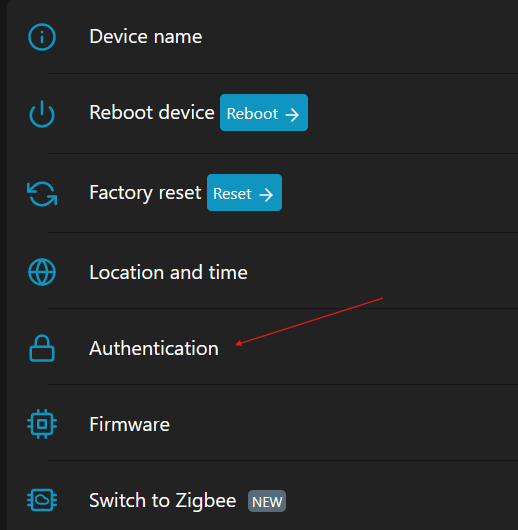
- This feature provides a restriction to the control and settings of the devices. However, this feature is available for local usage of the devices. It is not enabled for cloud connected devices. In other words, the devices will be protected by Username (ADMIN) and Password, only if they are controlled within the local Wi-Fi.
- This feature as well protects the devices for being controlled via HTTP request and when this is needed, the URL must contain the username (ADMIN) and the password used for the Authentication.
For example: http://admin:password@/rpc/Switch.Toggle?id=0
2. Lock PIN.
- This feature is available only at Shelly App and can be enabled individually for each device and the option to enable it can be found under "Application settings":
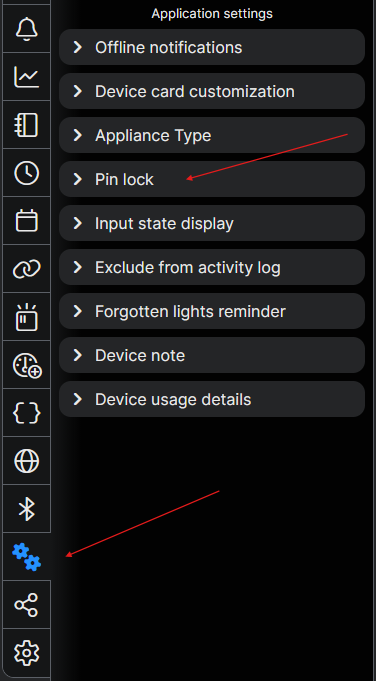
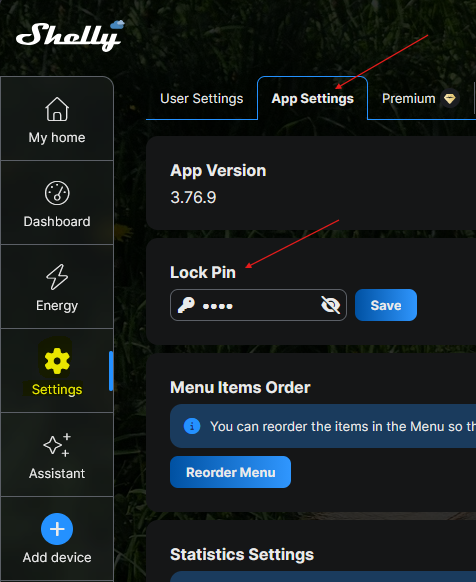
- This feature works only for the application, it's not affecting the local control of the devices. Here this feature will be protecting the control and settings access, on any change it will request to enter the PIN code.
It's important to remember the drastic differences between Lock Pin and Authentication, that Lock Pin is used for the Shelly App, but Authentication for the local control of the devices. Lock Pin is only numeric code, but Authentication is using both username (ADMIN) and password. Lock Pin can be enabled individually for each device and the PIN code is all the same for all of them, where in contrast Authentication can be defined individually for each device (each device can have its own unique username (ADMIN) and password).
Please note username in Authentication is always admin
username = admin